
Business video app
Business video that updates itself
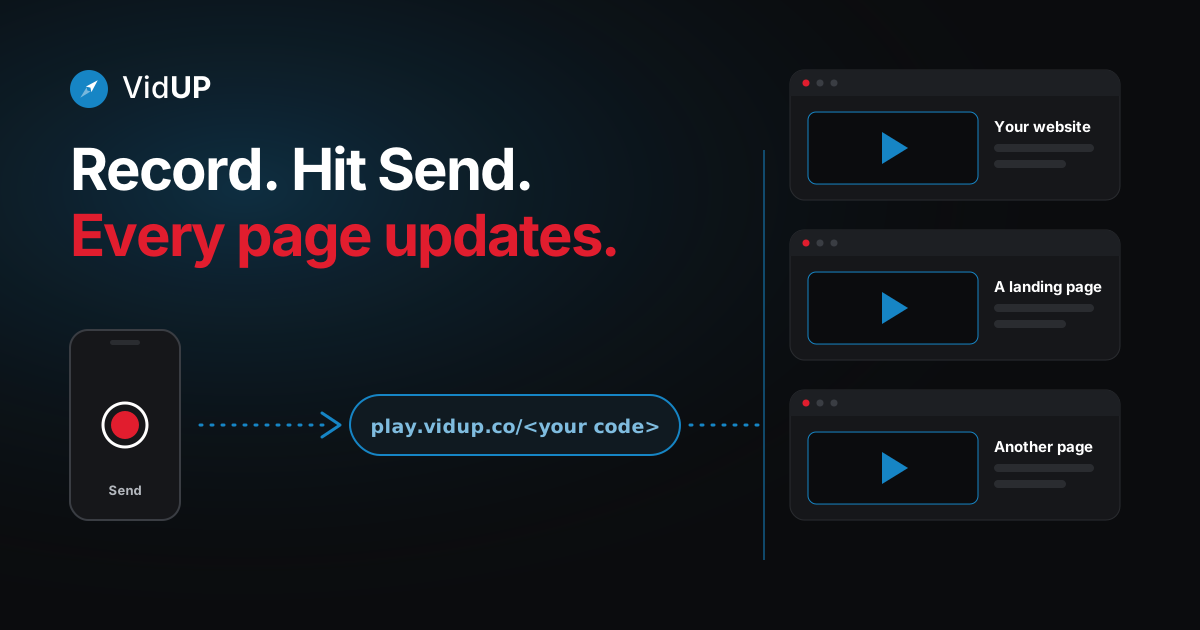
Business video is the short video that tells visitors who you are and why to choose you. The hard part is keeping it current. VidUP is the business video app that removes that part: paste one player on your pages once, then record a new video on your phone and hit Send. The same player shows the new video everywhere it is embedded. We removed the steps for updating a video.
Why most business video goes out of date
A website video is usually a one-time decision. Someone records it, uploads it, pastes the embed code, and moves on. Months later the offer, the team or the location has changed, but the video has not, because changing it means doing the whole job again.
The old way
- Record and export the new video
- Upload it to a video host
- Copy a new embed code
- Find every page that shows the old video
- Replace the code on each page, then check nothing broke
Every update repeats the whole list, on every page.
The VidUP way
- Paste your VidUP player on your pages once
- Open the VidUP app and record a new video
- Hit Send
The same player code stays on your pages. The new video replaces the old one everywhere it is embedded.
Multiply that by every page and every site you run and it is easy to see why updates get postponed. The fix is not a better to-do list. It is fewer steps.
The business video app that updates itself
With VidUP every account has one permanent player link, play.vidup.co/<your code>. You paste it on your pages the way you would paste any video embed. After that, the link never changes, and the video behind it does.
<iframe src="https://play.vidup.co/<your code>" style="aspect-ratio:16/9;width:100%;border:0" allow="autoplay; fullscreen; encrypted-media" allowfullscreen title="Business video"></iframe>Each new video you send replaces the old one on that player. Because every page points at the same player, every page updates together. VidUP is built on patented technology for exactly this: one player, any number of web pages.
Update it from your phone
Updating your video should not feel like a project. Open the VidUP app, record a new video, and hit Send. The one player on your site shows the new video. No re-uploading, no re-embedding, no editing the site.
Open the VidUP app
Your player code lives in your account. It never changes.
Record or choose a video
Record a short landscape take, or pick one you already have.
Hit Send
That is the whole update. No extra steps.
Your player updates
Every page that embeds your player shows the new video.
VidUP is on the App Store for iPhone. On Android, the VidUP web app runs in your phone's browser; the Google Play app is coming soon.
Where your business video can live
Paste the player anywhere an embed or iframe is accepted. If you use a site builder, there are shortcuts:
- WordPress: the VidUP Player plugin on WordPress.org.
- Wix: the VidUP Player app on the Wix App Market. See the Wix video app page.
- Shopify: an app is coming soon. Until then you can embed your player in Shopify with a custom Liquid block.
- Anywhere else: paste the iframe above, or learn how the auto-updating video embed works.
Making business video worth keeping current
A current video only helps if it is clear. A few habits that work for any business:
- Lead with one message. What you do and who it is for, in plain words.
- Keep it short. The free plan records 10-second takes; VidUP Pro records 60-second takes.
- Record landscape. The player is 16:9, so a sideways phone fills it cleanly.
- Refresh it when something changes. A new offer or a new season is a reason to hit Send, not a reason to edit a page.
Get VidUP for your site
Install the VidUP Player where your site lives, then update your video from your phone.
Guides
Business video app: what it is and how to chooseAdd a video to WordPress that updates itselfAdd a video to Wix that updates itselfAdd a video to Shopify (app coming soon)
Frequently asked questions
What is business video?
Business video is a short video that a business uses to introduce itself, explain what it offers or show its work, usually on its website, store, listings and landing pages. A clear, current business video helps a visitor understand who you are before they read anything else.
What is a business video app?
A business video app helps a business record, manage and show video. VidUP is a business video app built for one job: keeping the video on your web pages current. You record in the VidUP app, hit Send, and the one player you embedded updates everywhere.
How do I update my video?
Open the VidUP app on your phone, record a new video or choose one you already have, and hit Send. Your player code stays the same, so every page that embeds it shows the new video. VidUP keeps one live video per player, so keep a copy of earlier clips if you want to reuse them.
How do I update a business video without re-embedding it?
Embed your VidUP player once. It looks like play.vidup.co/<your code> and works in any page builder that accepts an iframe or an embed link. When you send a new video from the app, the player behind that link changes, so there is nothing to re-embed or edit on the page.
Where can I embed my business video?
On any site that accepts an embed or an iframe: WordPress (there is a VidUP Player plugin), Wix (the VidUP Player app is on the Wix App Market), Squarespace, Webflow and similar builders. A Shopify app is coming soon, and you can embed it in Shopify today.
Keep reading
One player. Update it from your phone.
Sign up, paste your player once, then record in the VidUP app and hit Send. Your pages show the new video.