
Shopify app coming soon
VidUP for Shopify
Shopify video app: coming soon, and you can embed it today
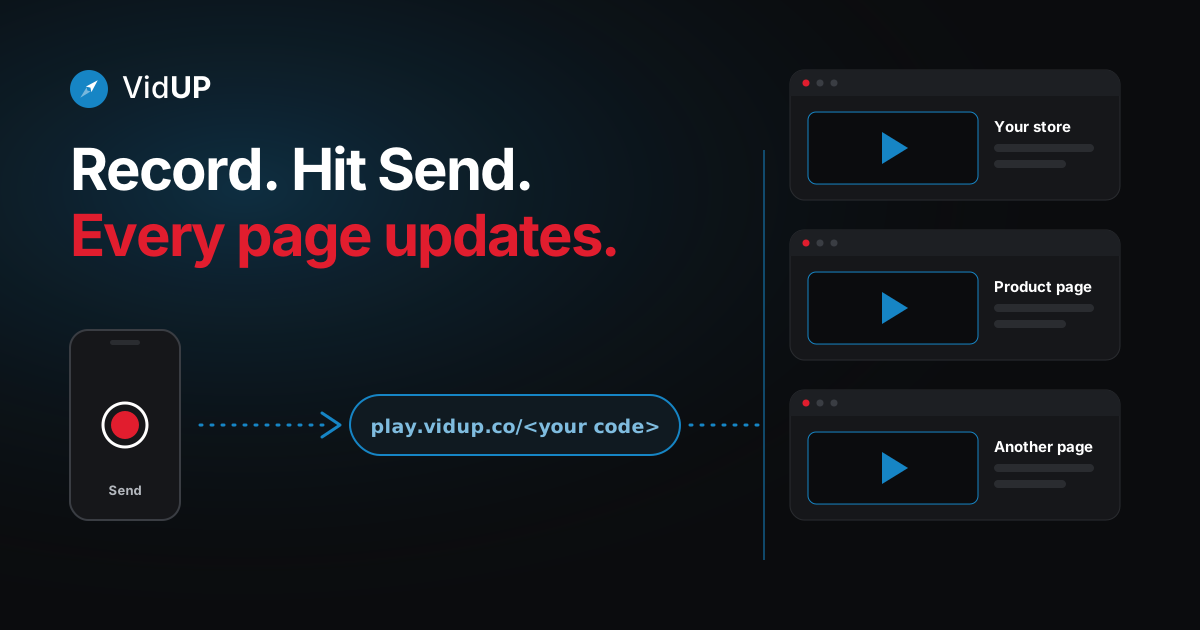
We removed the steps for updating a video. The VidUP Player app for Shopify is coming soon and is not in the Shopify App Store yet, but you do not have to wait. Paste your VidUP player in your store once with a custom Liquid block, then update your business video from your phone: record in the VidUP app, hit Send, and your store shows the new video. No re-uploading, no re-embedding, no editing your theme.
Embed your video in Shopify today
Get your player code
Sign up for VidUP. Your code is in your account.
Open the theme editor
In your Shopify admin, open Online Store, then Themes, then Customize.
Add a custom Liquid block
Add a custom Liquid block or section where you want the video.
Paste the embed and save
Paste the iframe below with your own code in place of the placeholder.
<iframe src="https://play.vidup.co/<your code>" style="aspect-ratio:16/9;width:100%;border:0" allow="autoplay; fullscreen; encrypted-media" allowfullscreen title="Business video"></iframe>Custom Liquid blocks are available in themes that offer them. If your theme does not, a custom HTML or code section works the same way.
Update it from your phone
Updating your video should not feel like a project. Open the VidUP app, record a new video, and hit Send. The one player on your site shows the new video. No re-uploading, no re-embedding, no editing the site.
Open the VidUP app
Your player code lives in your account. It never changes.
Record or choose a video
Record a short landscape take, or pick one you already have.
Hit Send
That is the whole update. No extra steps.
Your player updates
Every page that embeds your player shows the new video.
VidUP is on the App Store for iPhone. On Android, the VidUP web app runs in your phone's browser; the Google Play app is coming soon. Your Shopify embed never needs to change.
What the Shopify app will add
The VidUP Player app is planned as a simple block you add in the theme editor, so setup is a paste instead of a snippet. The player and your code stay exactly the same, which is why embedding today costs you nothing later. Read how the auto-updating video embed works, or see why business video is worth keeping current.
Also on Wix or WordPress?
VidUP Player is live for Wix on the Wix App Market (see the Wix video app page) and for WordPress as the VidUP Player plugin.
Guides
Business video app: what it is and how to chooseAdd a video to Shopify (app coming soon)
Frequently asked questions
Is there a Shopify video app for VidUP?
A VidUP Player app for Shopify is coming soon. It is not in the Shopify App Store yet. You can already show your VidUP player in a Shopify store with a custom Liquid block, as described above.
How do I update my video?
Open the VidUP app on your phone, record or choose a video, and hit Send. The player in your store shows the new video. You do not edit your theme, re-upload anything or paste a new embed code.
How do I add the VidUP player to Shopify today?
Sign up to get your player code, open your theme editor, add a custom Liquid block where you want the video, and paste the iframe for play.vidup.co/<your code> with your own code. Save, and you are done.
Will I need to change anything when the app arrives?
No. Your player code stays the same. The app will make setup simpler, but the iframe embed keeps working.
Where can I place the video in my store?
Anywhere your theme lets you add a custom Liquid block or section, such as the home page, a product page or a landing page. Use the same iframe on as many pages as you like; they all show your current video.
Keep reading
One player. Update it from your phone.
Sign up, paste your player once, then record in the VidUP app and hit Send. Your pages show the new video.