
Auto-updating video player
Auto-updating video embed: we removed the steps for updating a video
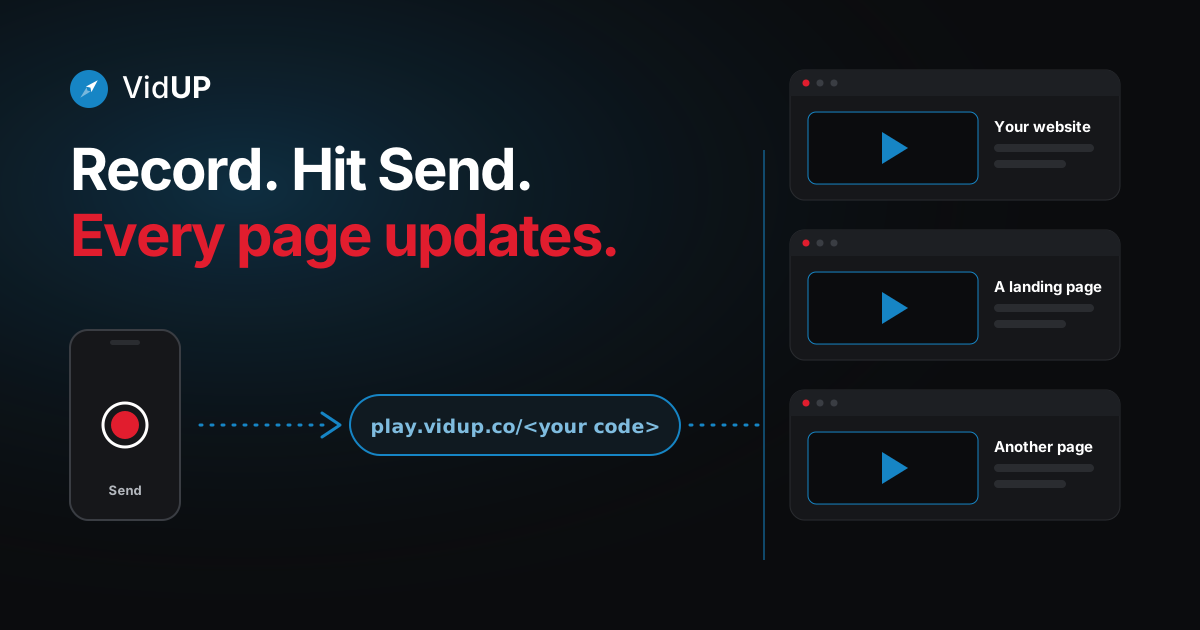
Same player code, new recording. Paste your VidUP video embed on your pages once. When you record a new video on your phone and hit Send, it replaces the old one everywhere it is embedded. No re-uploading, no copying a new embed code, no editing the page. This is the auto-updating video player behind the business video app.
The usual video embed, step by step
A normal video embed is fixed. The code you paste points at one specific video, so a new video means a new code.
The old way
- Record and export the new video
- Upload it to a video host
- Copy a new embed code
- Find every page that shows the old video
- Replace the code on each page, then check nothing broke
Five steps, repeated for every page that shows the video.
The VidUP way
- Paste your VidUP player on your pages once
- Open the VidUP app and record a new video
- Hit Send
Three steps in total, and only the first is ever done on your site.
How the auto-updating video player works
Your VidUP account has one permanent player link: play.vidup.co/<your code>. Embed it like any iframe:
<iframe src="https://play.vidup.co/<your code>" style="aspect-ratio:16/9;width:100%;border:0" allow="autoplay; fullscreen; encrypted-media" allowfullscreen title="Business video"></iframe>The link identifies your player, not a particular file. When you send a new video from the app, VidUP points that player at the new recording. Pages that already embed the player simply load the newest video the next time a visitor opens them.
That is why there is nothing to re-embed: the thing you pasted never changes.
Update it from your phone
Updating your video should not feel like a project. Open the VidUP app, record a new video, and hit Send. The one player on your site shows the new video. No re-uploading, no re-embedding, no editing the site.
Open the VidUP app
Your player code lives in your account. It never changes.
Record or choose a video
Record a short landscape take, or pick one you already have.
Hit Send
That is the whole update. No extra steps.
Your player updates
Every page that embeds your player shows the new video.
VidUP is on the App Store for iPhone. On Android, the VidUP web app runs in your phone's browser; the Google Play app is coming soon. Use it for the same player you already embedded; there is nothing to reconfigure.
What stays the same, and what changes
- Stays the same: your player code, your embed on every page, the size and layout you chose.
- Changes: the video. One new send replaces it everywhere.
- Good to know: VidUP keeps one live video per player, so a new send replaces the previous one. Keep copies of clips you want to reuse.
Looking for the full picture? Read about business video that updates itself.
Get VidUP for your site
Install the VidUP Player where your site lives, then update your video from your phone.
Guides
Business video app: what it is and how to chooseAdd a video to WordPress that updates itself
Frequently asked questions
What is an auto-updating video player?
It is a video player whose video can change without its embed code changing. With VidUP you embed play.vidup.co/<your code> once. When you send a new video from the VidUP app, that same player shows the new video.
How do I replace a video on my website without changing the link?
Record a new video in the VidUP app and hit Send. The new video replaces the old one on your player, and every page that embeds the player shows it. You do not edit the page.
How do I update my video?
Open the VidUP app, record or choose a video, and hit Send. There is no re-uploading to your site, no re-embedding and no page editing. VidUP keeps one live video per player, so save earlier clips yourself if you want them again.
Does it work on any website?
It works on any site that allows an iframe or an embed link, including WordPress, Wix, Squarespace and Webflow. Some builders only offer a basic video block; look for an embed or custom code option.
Can I use one player on many pages?
Yes. The same player can be embedded on as many pages and sites as you like, and they all show your current video.
Keep reading
One player. Update it from your phone.
Sign up, paste your player once, then record in the VidUP app and hit Send. Your pages show the new video.